Explore top Bluetooth OBDII scan tools that work with iPhone, Android, and other devices. This guide highlights five highly capable models, detailing what they read, how they connect, and who benefits most. Whether you’re a DIY mechanic, a daily commuter, or a curious car owner, these tools help you read codes, monitor live data, and assess vehicle health without a trip to the shop.
Summary of selected products:
- BlueDriver Bluetooth Pro OBDII Scan Tool
- Veepeak OBDCheck BLE Bluetooth OBD II Scanner
- Panlong OBD2 Scanner Bluetooth
- Veepeak OBDCheck BLE+ Bluetooth OBD II Scanner
- UMEIJA OBD2 Scanner Reader Bluetooth Wireless
BlueDriver Bluetooth Pro OBDII Scan Tool
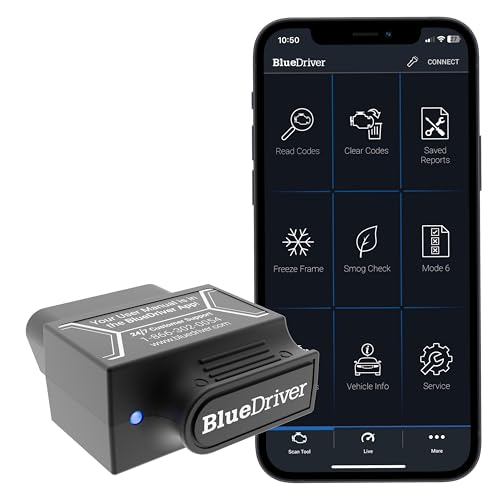
BlueDriver positions itself as a professional-grade diagnostic tool that pairs with phones for comprehensive vehicle insights. It reads and clears engine codes and checks the health of ABS, SRS, TPMS, and more. Users gain unlimited repair reports with potential causes and fixes, plus live data monitoring for real-time health status. This model operates without ongoing subscription costs, making it attractive for regular, long-term use. The user experience centers on matching professional-level diagnostics with consumer-friendly app access and clear defect explanations.
Key features include: easy scanning of trouble codes, clearing checks engine lights, and broad DAS (diagnostics) coverage for common systems. Real-time data helps users verify fixes as they drive, while unlimited repair reports provide a reference library. It’s oriented toward iOS and Android compatibility, requiring the BlueDriver app and wireless pairing to deliver actionable diagnostics. This makes it a solid choice for homeowners who want accurate, guided repair information without dealer visits.
Veepeak OBDCheck BLE Bluetooth OBD II Scanner

Veepeak’s OBDCheck BLE focuses on broad compatibility and a straightforward Bluetooth setup. It supports Bluetooth LE and Classic on Android and BLE on iOS, connecting within supported apps without pairing via the phone’s Bluetooth menu. It covers generic OBD-II functions such as reading and clearing codes, viewing freeze frame data, I/M readiness, and live sensor data to help monitor vehicle health. App support is a critical consideration, as the device depends on a compatible third-party app to unlock its full feature set. This makes it a practical pick for users who already use established OBD apps.
What to know: this tool emphasizes straightforward diagnostics with essential live data. It’s a good match for users who want a cost-effective, easy-to-use solution for routine maintenance checks and quick checks for CEL status. As with many BLE devices, user experience can hinge on the chosen app and device compatibility, so reviewing app ratings and supported functions is wise before purchase.
Panlong OBD2 Scanner Bluetooth for iPhone and Android

Panlong’s OBD2 scanner targets versatility, turning a phone into a professional-grade diagnostic tool. It supports monitoring the vehicle’s performance in real time, reading and erasing codes, and running tests such as I/M pre-inspection and EVAP checks. The device aims to help users determine if a repair is DIY-feasible. Its emphasis on real-time data and freeze frame information supports pinpointing issues quickly, which can save time and money on routine repairs or less severe malfunctions.
Compatibility notes highlight broad vehicle support for 1996 and newer OBD-II compliant cars, with caveats for certain 24V diesel and non-OBD-II compliant models. The Panlong scanner’s value lies in its balance of price and functionality, appealing to enthusiasts who want deeper diagnostic options without stepping up to high-end hardware. Users should pair it with a well-regarded OBD app to maximize the data interpretation benefits.
Veepeak OBDCheck BLE+ Bluetooth OBD II Scanner

This variant from Veepeak expands on their BLE offerings with Bluetooth LE plus Classic connectivity options for Android, and limited BLE support on iOS. It emphasizes generic OBD-II functions, including reading and clearing codes, viewing live data, and monitoring emission readiness. Like the other Veepeak model, app compatibility is a central factor; the device’s true utility emerges when paired with robust apps such as OBD Fusion, Car Scanner, or DashCommand. Prospective buyers should assess their preferred app ecosystem and device compatibility to ensure seamless operation.
The BLE+ builds on the core features by offering improved stability for some setups and a familiar interface for users already leveraging Veepeak’s ecosystem. It suits budget-conscious buyers who want reliable diagnostics, live data, and a reasonable breadth of supported functions without diving into premium tooling.
UMEIJA OBD2 Scanner Reader Bluetooth Wireless

UMEIJA’s OBD2 scanner emphasizes comprehensive performance testing and a user-friendly interface designed for both newcomers and experienced enthusiasts. It supports reading fast DTCs, live data streaming, VIN retrieval, freeze frame data, and various diagnostic reports. The device highlights convenience by offering guided interpretation of check engine codes and potential fixes, potentially reducing guesswork during repairs. It also notes compatibility with a wide range of 1996+ gasoline and diesel vehicles in the US, with a clear caveat for non-OBD-II compliant or non-gasoline/diesel hybrids.
Users should consider the app ecosystem that accompanies this scanner, as well as the breadth of supported protocols. While it provides many diagnostic capabilities, the ultimate value depends on how easily the app presents the data and whether it offers actionable guidance. This model is a practical option for those who want an all-in-one tool for monitoring, fault code clearing, and data visualization on a compatible smartphone or tablet.
Buying Guide: Key Considerations For Selecting A Bluetooth OBDII Scanner
Compatibility and device ecosystem: Ensure the scanner supports your vehicle’s year, make, and model, and confirm compatibility with your smartphone’s operating system (iOS or Android) and preferred diagnostic apps. Some devices require specific apps to unlock full features, while others work with multiple apps.
Connection type and ease of use: Bluetooth LE (BLE) vs Classic Bluetooth can affect pairing and stability. BLE often provides smoother connections on newer phones, especially with iOS devices, while some Android setups may prefer classic modes. Look for devices that pair quickly and maintain a stable connection during live data streaming.
Scope of diagnostics: Decide whether you need basic code reading and clearing or deeper features like live data streaming, I/M readiness, freeze-frame analysis, and repair reports. Professional-grade tools may add value with repair guidance, while budget models excel at quick checks and routine maintenance.
App support and user interface: A well-designed app with clear code definitions, possible fixes, and intuitive charts enhances usefulness. Check user reviews to gauge how easily the app presents data and whether firmware updates have improved reliability over time.
Vehicle coverage: Some scanners emphasize broad compatibility, while others focus on specific brands or vehicle categories (gasoline vs diesel, hybrid). If you own an older vehicle or a fleet, confirm how the device handles your typical vehicles’ emissions systems and diagnostic modes.
Build quality and portability: Since you’ll likely use the device in tight spaces under dashboards, ensure the scanner has a sturdy build, a reliable cable length, and a compact footprint. A durable device reduces the risk of damage during field diagnostics.
Cost of ownership: Some tools advertise no ongoing subscription fees, while others may include optional paid features or premium apps. Compare total costs over time, especially if you plan to use the tool frequently or across multiple vehicles.
Privacy and data handling: Consider how diagnostic data is stored or shared, especially if the tool integrates cloud services. If data privacy is a concern, review the manufacturer’s data policy and any user permissions required by the app.
Bottom line: For everyday car owners, a Bluetooth OBDII scanner should deliver reliable code reading, actionable live data, and smooth app integration. If you frequently troubleshoot or want deeper repair guidance, lean toward models offering robust repair reports and broader system coverage. Always verify app compatibility and vehicle support before purchasing.