Transform your wired CarPlay system into a seamless wireless experience with adapters designed for Apple iPhone users. The right CarPlay adapter lets you keep steering wheel controls, maps, music, and calls while removing the tangle of cables. This guide highlights five reliable options that balance speed, stability, and ease of use across a wide range of vehicles. Each pick supports iOS 10 and newer, works with cars that already have wired CarPlay, and aims to minimize latency so you can focus on driving.
| Product | Brand | Key Benefit | Compatibility Notes |
|---|---|---|---|
| Teeran Wireless CarPlay Adapter 2025 Upgrade | Teeran | Ultra-compact, fast dual-band connectivity | iPhone iOS 10+, wired CarPlay cars |
| HAKT 2025 Upgraded Wireless CarPlay Adapter | HAKT | Instant connection, wide compatibility | Most cars with wired CarPlay; USB-C available |
| TKHIN Mini CarPlay Wireless Adapter | TKHIN | Mini USB design, plug & play | Apple wired CarPlay cars; iPhone 7+ and up |
| JDG Wireless CarPlay Adapter | JDG | Fast auto-reconnect, stable performance | Wired CarPlay cars; iOS 10+ |
| Burnt Sugar Wireless CarPlay Adapter | Burnt Sugar | Ultra-low latency, broad compatibility | 2016+ cars with wired CarPlay |
Teeran Wireless CarPlay Adapter 2025 Upgrade

Teeran presents a revolutionary mini design that fits nearly flush in a car’s USB port, letting you add wireless CarPlay without clutter. It supports iPhone models with iOS 10 and above and works with vehicles that already have wired CarPlay. Setup is straightforward: plug into the USB port, pair via Bluetooth, and the adapter quickly connects on startup. The device uses a dual-band 2.4 GHz and 5 GHz chipset to improve stability and reduce interference, delivering smoother music streaming, navigation, and hands-free calls. A compact shell helps dissipate heat and minimize space usage, making it suitable for tight interiors.
In practical terms, Teeran aims for automatic reconnection after the initial pairing, so you can leave your phone in your pocket and still enjoy CarPlay as soon as you start the car. While the wireless link is designed for a seamless experience, real-world results can vary based on the car’s original CarPlay implementation and firmware updates. The design emphasizes simplicity and reliability over flashy features, aligning with drivers who want a clean, cable-free cabin without sacrificing CarPlay functionality.
Jemluse Wireless CarPlay Adapter for iPhone

Jemluse combines a multi‑user approach with fast connectivity for CarPlay. The device uses a high-performance 5.8 GHz WiFi channel with Bluetooth and an eight-core processor to boost transmission speed for maps, music, messages, and apps on the car display. The chipset is designed to withstand environmental stress and maintain performance in a wide temperature range, providing reliable operation in daily driving. The compact dongle features a robust metal construction that improves heat management and durability, delivering a balance between form and function. Setup is instant and pair‑and‑play enabled, with automatic online updates supported.
Jemluse emphasizes a seamless in-car experience, aiming to minimize disconnects during long drives and multi‑user scenarios. While its design focuses on reducing latency and maintaining stability, users should verify compatibility with their specific make and model, as some unique infotainment systems may have edge cases. Overall, Jemluse targets drivers who want a sleek, high‑performance upgrade with straightforward operation and ongoing support.
HAKT 2025 Upgraded Wireless CarPlay Adapter

HAKT’s 2025 upgrade emphasizes broad compatibility and a discreet form factor. The adapter supports iPhones running iOS 10 and newer and includes a USB‑C adapter to accommodate vehicles with USB‑C ports. The device claims to work in most cars, helping keep steering wheel controls and dashboard functions intact while providing wireless CarPlay. It uses Bluetooth 5.3 and a modern chipset to minimize dropouts and ensure quick handoffs between the car’s ignition and the infotainment system. A small, mini design integrates neatly into the vehicle interior, reducing clutter and complexity for the driver.
Performance notes highlight rapid first‑connect times (a few seconds) and robust auto‑reconnection, which helps when you frequently step in and out of the vehicle. Real‑world performance depends on the car’s factory CarPlay configuration and firmware status. HAKT focuses on stability, reliability, and broad vehicle coverage, making it a practical choice for a wide range of 2016+ models that already offer wired CarPlay.
Mini CarPlay Wireless Adapter TKHIN

TKHIN’s Mini CarPlay Wireless Adapter is designed for Apple wired CarPlay cars and emphasizes compact form and plug‑and‑play convenience. It supports iPhone models from 7 and later, running iOS 10 or higher. The device ships with both USB and Type‑C extension cables to suit various installation scenarios, offering a versatile way to place the dongle in or near the USB port. After initial pairing via Bluetooth and Wi‑Fi, it reconnects automatically each time you start the car, delivering a fast and seamless CarPlay experience without the need for advanced setup.
In terms of compatibility, TKHIN targets mainstream wired CarPlay implementations, with explicit notes that some high‑end or nonstandard systems may not be supported. The design prioritizes user‑friendly operation and network stability, making it a reliable option for drivers looking for a small, unobtrusive adapter that preserves all CarPlay features—maps, music, calls, and messaging—through a wireless link.
Burnt Sugar Wireless CarPlay Adapter
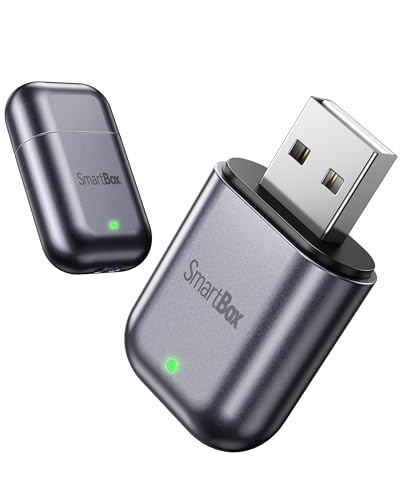
Burnt Sugar emphasizes speed and stability with a dual‑band approach that combines 2.4 GHz and 5 GHz wireless networks along with Bluetooth 5.3. The result is lower latency and more reliable performance for CarPlay navigation, apps, and media. The adapter is designed to be plug‑and‑play, converting wired CarPlay to wireless with no additional apps required. It aims to auto‑connect whenever the car is powered, helping minimize distractions during commutes and longer trips. Compatibility spans a wide range of 2016+ models that originally come with wired CarPlay, though some exceptions may apply for certain brands or configurations.
Burnt Sugar highlights extensive compatibility and fast handoffs to the CarPlay interface, addressing common issues like dropouts and connection delays. The device’s durability and heat management are reinforced by its build quality, making it suitable for regular, daily use. Prospective buyers should verify model‑specific compatibility and ensure the USB port in use supports data transfer, not just charging, to ensure reliable operation.
Buying Guide
Key Compatibility Factors
Start by confirming that your vehicle has wired CarPlay preinstalled. These adapters convert the wired CarPlay experience to wireless but typically require iPhone compatibility with iOS 10 or newer. Check your car’s model year and infotainment system details for any caveats or exceptions. Some cars with proprietary or highly integrated CarPlay implementations may have limited support or require firmware updates from the manufacturer. If you drive a Tesla, BMW, or a few other brands with unique interfaces, verify compatibility with the exact model and trim before purchasing.
Connection Type and Latency
Most adapters use a blend of Bluetooth for initial pairing and Wi‑Fi (often 2.4 GHz and 5 GHz) for data transmission. Dual‑band support typically yields better stability and lower latency, which matters for navigation prompts, live maps, and streaming. Consider a model with auto‑reconnect and quick first‑connect times for a seamless experience. If you frequently park in areas with spotty wireless networks, look for devices with robust re‑pair logic and a strong chipset to minimize hiccups during drive cycles.
Ease of Use and Setup
Plug‑and‑play operation is the gold standard. Favor adapters that require no extra apps or complex firmware updates after the initial setup. A quick setup with one‑time Bluetooth/Wi‑Fi pairing and automatic reconnection at each car start will reduce friction. Some dongles ship with USB‑C cables to accommodate newer ports, which adds flexibility for a broader range of vehicles. Finally, ensure the product’s documentation clearly states the steps for pairing and any necessary updates for ongoing reliability.
Design and Durability
A compact, low‑profile design helps the adapter blend into your car’s interior and reduces the risk of snagging or interference with the gear shift. Durable materials and heat management matter for long drives. If the unit includes extra cables, confirm their lengths and connector types match your vehicle’s ports. A metal shell or reinforced housing can improve longevity in daily use and automotive heat environments, while a light footprint helps preserve dashboard aesthetics.
Brand Trust and Support
Because compatibility and firmware can vary by vehicle, choosing a reputable brand with clear support policies matters. Look for warranty coverage, documented compatibility lists, and accessible customer service. Reading user reviews focused on real‑world reliability and longer‑term performance can provide practical insights about auto‑reconnect behavior, latency, and how well the device holds up over time. A trusted brand is more likely to offer firmware updates that maintain compatibility with evolving iOS versions.
In summary, the best Apple CarPlay adapter for you depends on your vehicle’s specific wired CarPlay setup, your iPhone model, and how important ultra‑low latency and compact design are to your daily driving. The options above provide a spectrum of performance, from ultra‑compact mini designs to feature‑rich, broad‑compatibility devices. Evaluate your car’s USB port type, the required firmware status, and whether you prefer a plug‑and‑play approach or a device that emphasizes speed and stability for maps, music, and hands‑free calling. Selecting the right adapter can deliver a cleaner cabin and a more convenient driving experience without sacrificing CarPlay functionality.